Home
PowerForce 
Introduction
Profiles are designed to limit user access to organisational structure. Principally this is to limit visibility of pay rates and budget data across departments.
The following document outlines how to assign a profile to a user login and what that will affect.
|
Getting There:
[ Aministration ] –> Organisation Profile
|
Top of Page
Introduction
To control access to data, PowerForce has a facility referred to as the Organisation Access. When you open the Organisation access screen, you must first select or create a Organisation Profile.
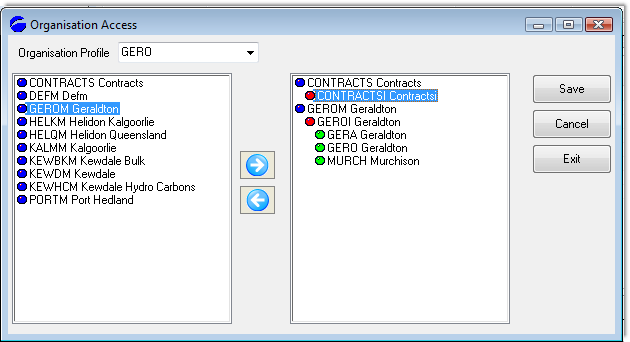
Data is moved to the RHS to configure a component of the profile. If you subsequently wish to remove an entry on the RHS, select it and use the 'chevron' (arrow) to move it to the LHS.
Top of Page
User Access
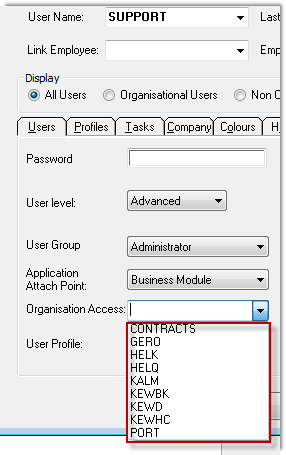
You link the Organisation Access to a user login via the Adminitration / Users screen, as below:
Top of Page
Data making up Org Access
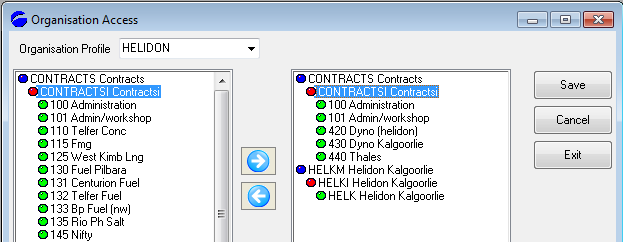
Refer to the Setting up an Organisational Profile document detailing how the organisation profile entries are made.
When adding a new location into the MCORP environment, a client record needs to be created for each new location added.
Top of Page
Section
Top of Page
See Also
 PowerForce Controls PowerForce Controls
Setting up an Organisational Profile
Top of Page
|