Home
Reporting
Introduction
This document outlines the current reporting menus which replace the various individual reporting windows that you may have used up until now.
|
Getting There:
[ Nav ] –> Scheduling / Mitchell Reporting
|
Introduction
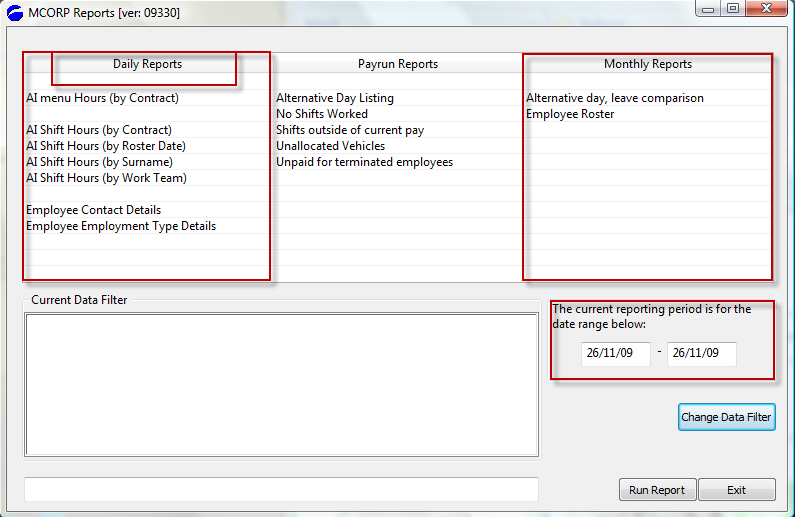
The intent of the new reports menu is to bring together all the reporting needs to one screen. The example main report screen is as per the following image:
Top of Page
Sections of the screen
The significant items on the screen are the disection of the reports into a rough period based division. As you see there are the daily reports, which indicate that when you run them, they reports will generally bring back information only on the date(s) shown the the section noted as "the current reporting period". As you can see in this instance, the selection spans only the one day.
You may of course change this by clicking on the Change Dta Filter button, which will take you to a new screen where you may make various other choices to limit the criteria against which the report will run.
Top of Page
Menu Options
The image above is a sample of both the selection and positioning of the items. The above approach lends itself to the addition of new reports as they become available.
Top of Page
Top of Page
Current Data Filter
This is an information only display reminding you of the filter criteria that you may have selected.
Top of Page
Change Data Filter
This option is to allow you to change the generic data selection of a report. If you were to run a report and the report had too much data for the selection that you were interested in, you would then use the Data Filter to select a narrower choice of data to select on. Press on the Change Data Filter selection below to see the available options.
Top of Page
Run Report
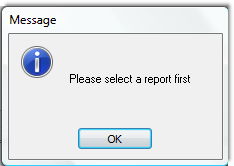
You must first select a report that you wish to run, and then press the Run Report button. If you do not select a report an error message will prompt you.
Top of Page
Summary
This is the first version of the reporting facility, as new features and functionality is introduced this section of the documentation will be expanded to detail the changes.
Top of Page
See Also
 Change Data Filter Change Data Filter
PowerForce Controls
Running a Sample Report
Top of Page
|