Home
Copying Data
Introduction
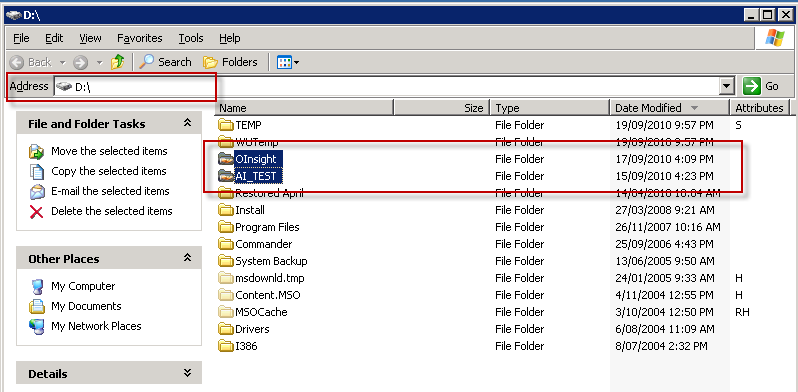
AI resides in a single directory on server 10.33.6.103 on the D:\OINSIGHT drive/directory.
The AI test system resides on the same server in directory D:\AI_TEST.
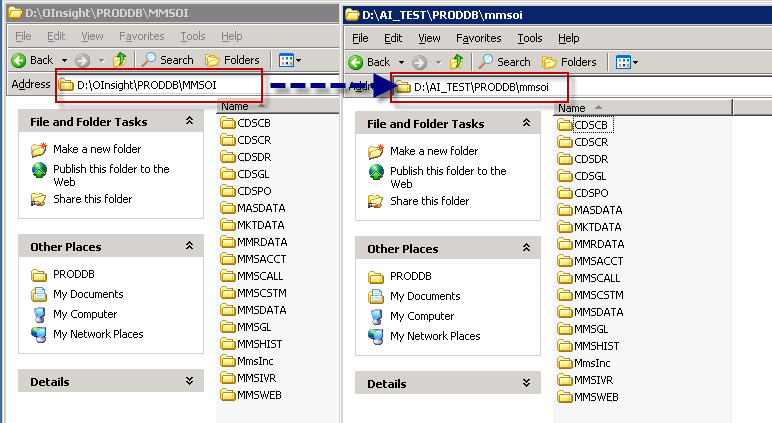
The actual application data files are in a further sub-directory of each of the above directories, PRODDB\MMSOI.
Top of Page
Directory Structure (Drive D:)
The following diagram illustrates the Production and Test directories of AI.
To update the data tables within AI_TEST, all that is required is to copy the sub-directories from production to test.
Top of Page
Copying data between the directories
To copy data between the two directories will require the use of the DOS utility xcopy.
Using windows file manager will not work if there are any users using AI, as file manager will report "file in use" errors, and it will not copy the data.
The following images demonstrate the xcopy command and how to invoke it.




Top of Page
Data Backups
As a cautionary note, always ensure that your production data is backed up prior to copying between production and test.
And, copying data is optimally done when there is no one using AI.
Top of Page
See Also
 PowerForce Controls PowerForce Controls
|