Home

Introduction
This process is mandatory to enable the export of data collected / generated within Powerforce to your external General Ledger.
Setting up
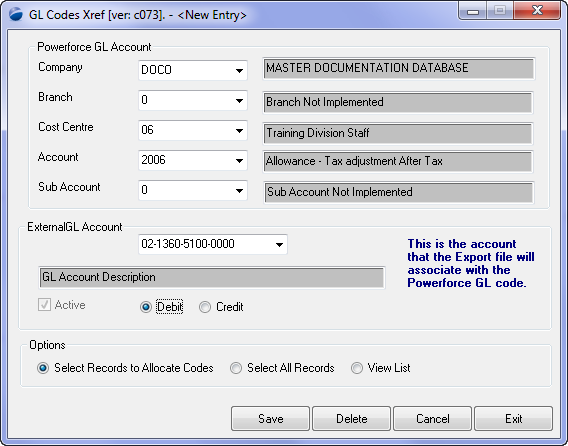
This form is used to map the internal Powerforce GL number to your external GL account number. On a per company basis, enter each of the fields within the Powerforce GL account section & then select the previously defined external GL account number.
Top of Page
Existing Data
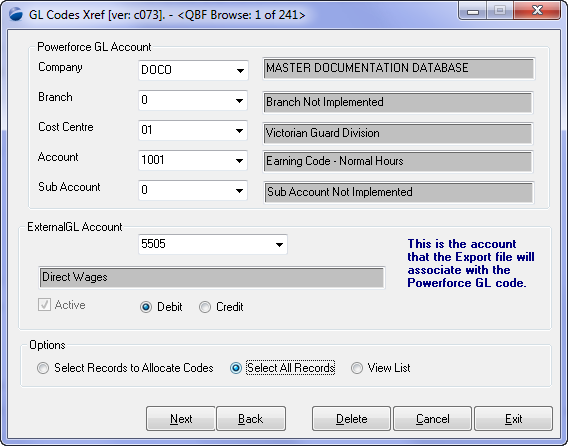
As the Powerforce internal GL is extensive, there is a means to speed up the link to your external code:
- Click the "Select All Records" radio button - this will select all the internal Powerforce GL codes, and
- Enter your External GL Account through the dropdown.
- Press the Next button to move onto the next internal Powerforce account number.
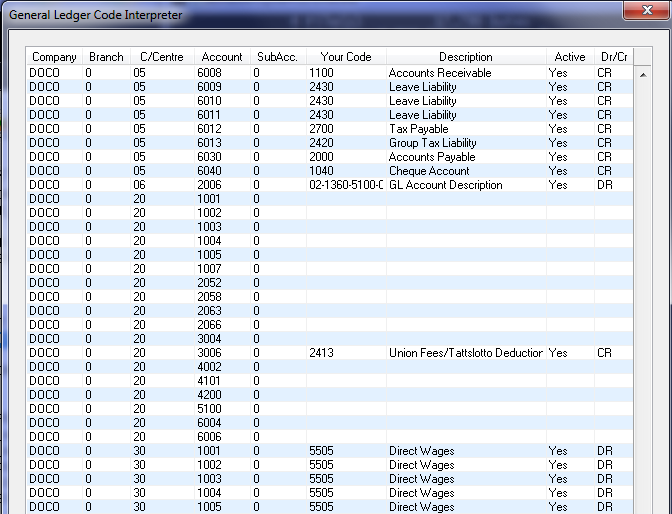
To see the complete list of Internal codes, check the Select All Records, then View List which shows the list as per below. From the display you may clearly see which codes are incomplete.
See Also
 PowerForce Controls PowerForce Controls
|