Home
PowerForce (Internal Only) Support™
Bob's Tricks
COMMON /myCommon/ bInitialised%, .....
IF assigned(bInitialised%) ELSE bInitialised% = false$
IF bInitialised% = true$ ELSE
GOSUB init
END
...
...
init:
...
bInitialised% = true ; // make this the last entry - so that you're sure it's all done.
Top of Page
EOY processing
Checking employee self-sacrifice Super:
list employee with VOL_SGL VOL_SGL VOL_SGL_AMT VOL_POLICY - <55> <56> <57>
Field TAX_TYPE <35> says before/after tax
SUPER_CHANGE_FUND <146>
employee_ytd has fields <16> & <20> for the BEFORE/AFTER mode ?
Top of Page
Moving Powerforce between 2 servers
Whilst doing the move, a configuration requirement came up, hence your IT guys will have to complete this for you prior to decommissioning the old server on \\acsfs1.
Each workstation registers 2 .ocx files (vsprint7.ocx and vspdf.ocx)
- These are currently registered against acsfs1 either via a drive mapping or UNC ( we don’t know).
- If via a drive mapping, then the re-mapping of the drive letter to acssql\\powerforce will make everything work without a need for re-registration.
- However, if the mapping is via UNC, then workstations will require a remap to the new server
- The \\powerforce shares on each server are currently in sync.
- What needs to happen once the re-map is undertaken, is that the sub-directories under <orig_drive>proddb\*.* are copied over to the equivalent sub-directory location on \\acssql\powerforce\proddb
- Remember to turn off virus checking on the new server against files ending in .ov and .lk (these are data files).
Top of Page
Programming Tricks
Programming an OLE control for ie (web browser).
call send_message(olehtml, 'OLE.Navigate2","about:blank") ; // put it into webbrowser mode
call send_message(olehtml,"OLE.document.open")
call send_message(olehtml,"OLE.document.write",body) ; // write the text
call send_message(olehtml,"OLE.document.close")
Top of Page
Da
Payroll
- To un-commit a run, PAYRUN<11> set to 0.
& PAYRUN<27> to "". Has to be .null. as it's a date field
Section
Top of Page
SQL
Top of Page
Quick data archive
To do a quick archive
Clear payrun, pay_details - use 'mpd_clear_payrun'
Clear audit_roster
Clear rtc - first remove the indices, the use 'mpd_clear_rtc'
Rebuild indices
ACS
ACS
Billing
When running an invoice run (repetitive - this is the script which gets run).
SELECT ROSTER_TIMECARD WITH ROSTER_DATE FROM "30/07/12" TO "05/08/12"
SELECT ROSTER_TIMECARD WITH COY_DEBTOR EQ "ABS"
SELECT ROSTER_TIMECARD WITH UNINVOICED_STATUS = 1
SELECT ROSTER_TIMECARD WITH NO INVOICE_XREF
SELECT ROSTER_TIMECARD BY CUSTOMER BY ROSTER_DATE
Top of Page
SRP programming hints
http://wiki.srpcs.com/index.php
SelChanged.OLE_TAB:
transfer param1 to page
send_event(@window, "PAGE", page)
send_event(@window, "VSCROLL", page)
RETURN
Generic OI TabControl
In the <Script> of tabControl, value = get_property(ctrlentid, "VALUE")
set_property(@WINDOW,"VPOSITION",value)
On last TAB page, a 'tab' off will goto page1 but not swap the display
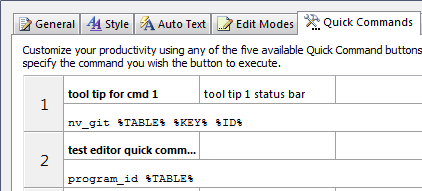
Setting up the SRP EDITOR for quick commands: setup the links as follows and the program they call with 3 params to accept the parameters passed in. When definining the setup, do not use braces. Seperate the params with a comma as per this image.
Top of Page
A Guide to System Environment (SYSENV) Configuration Records (CFG)
SYSENV config records:
All the modern config records discussed below follow the same naming convention. They are all named CFG_<SOMETHING>, and there may be multiple instances for CFG_<something> found in the SYSENV table; these multiple instances allow the <something> configuration to be specific to a particular application and user, or a specific user (regardless of application), or a specific application (regardless of user), or a global default. In order, the specific instances are named:
CFG_<something>*<appid>*<username>
CFG_<something>**<username>
CFG_<something>*<appid>
CFG_<something>
The <something> process will look, from the most to least specific, for a matching configuration record.
CFG_CTO: Controls CTO and AREV32 connection behavior
* 1. IP Address of engineserver, or path to revcap32.dll (may be . or windows path, or URL of EngineServer)
* 2. Port number {]EngineName]StartupFlags]ShutdownFlags}
* 3. foreground color name
* 4. background color name
* 5. title
* 6. routine to run (may be explicit string <<NONE>> to override default behavior of calling AREV32 when using AREV32_CHILD_FORM/AREV32_STANDALONE_FORM)
* 7. Font name
* 8. Macro record name (or <table><space><record name> if not in SYSENV)
* 9. Optional character/Unicode mapping routine
CFG_CTODICT: Used to control AREV32 and CTO dictionary handling
Field 1: "1" does not modify the dictionary ID during the read or write process, "0" the dictionary ID may be modified (which is the default behavior)
CFG_IDX_SETS: Used to determine which version of IDX_SETS are used original or .NET
Field 1: X
Field 2: blank (to use most recent version of .NET), or IDX_SETS1 to use original IDX_SETS
CFG_INET: Controls RUN_OECGI_REQUEST behavior, used by both INET_ and O4W_ routines
Security Routine (INET_SECURITY) ] Wrapup Routine (INET_FINALIZE) ] Abort routine (INET_ABORTED) ] White list routine (INET_WHITELIST)
Error text (@TM delimited)
Default CGI extension (.CGI) ] Default page url portion (/page)
Blank by default, set to 1 to have multiple instances of variables in the queryparam reduced to just the first instance
@VM delimited list of INET_xxx routines that are allowed to run
CFG_LOGIN: Used to determine whether OI does single sign on, and how it validates users
*-------------------------------------------------------
* SYSENV*CFG_LOGIN
*-------------------------------------------------------
* This record controls single sign on behavior
* Set loginmode (field 1) , user groups ( fields 2,3, 4) validation mode (field 5) as needed
* Save as CFG_LOGIN*MYAPP to make an application specific setting
* Save as CFG_LOGIN to affect all applications in this copy of OpenInsight
*---
* Layout
*---
* <1> = LoginMode
* <2> = LDAP Groups whose members are Normal users
* <3> = LDAP Groups whose members are Admin users
* <4> = LDAP Groups whose members are Sysadmin users
* <5> = Validation Mode
*---
*--
* LoginMode Description
*--
* LoginMode = "0" (or "" or invalid) ==> use legacy authentication, require a username/password combination define in the OpenInsight application users list.
* LoginMode = "1" ==> get network user name, no password required, user name must exist in OpenInsight application users list.
* LoginMode = "2" ==> get network user name, no password required, user must be a member of a network group listed in config record <2>, <3>, or <4>
*---
* Notes
*--
* The Login process will search for a record named CFG_LOGIN*appname, for example CFG_LOGIN*EXAMPLES
* If that record does not exist OI will search for this record, CFG_LOGIN
* If CFG_LOGIN does not exist OI will behave as if loginmode = 0
CFG_O4W: Used for embedded O4W forms (specifically, the O4W_CHILD_FORM and O4W_STANDALONE_FORM)
/* Layout of CFG_O4W{*{<appid>}{*<userid>}}
* 1. Default URL (used if no create params specified)
* 2. {Default Width] Default Height}
* 3. SiteName ]
* 4. URL for site ]
* {5. Title] }
* {6. ProgType] }
* {7. ProgDetail] }
* {8. Width] }
* {9. Height] }
* {10. Secure flag] }
*/
CFG_OIBRW: Used to control the new Banded Report Writer
* 1. path or url to use for connection (use . Or windows path for direct connection, or EngineServer URL)
* 2. Port (for EngineServer, if used)
* 3. engineName (blank to auto-determine, or * to use the current oengine)
* 4. Startupflags (blank for defaults, 0 if using the current oengine)
* 5. Shutdownflags (blank for defaults, 0 if using the current oengine)
* 6. Routine to return tables and procedures (blank for default RTI_BRW_FILTER)
* 9. <intentionally left empty>
* 10. Optional UTF8 override: set to '1' to always use UTF8 mode, set to '0' to always use ANSI mode, or leave blank to determine based on current OpenInsight value
CFG_OIPI: Used to control which print engine (OIPI or OIPI.NET) is used
* 1. is either VSPRINTER2 (which uses OIPI.NET) or anything else (which used OIPI)
* 2. Optional cache flag: set to '1' to cache the current settings of VSPRINTER2 or VSPRINTER, or set to '0' (or leave blank) to read this value for each request
CFG_NETOI: Used to process many common output conversion codes locally, rather than on the host
Field 1 is either 0 (NetOI will not process the conversion codes locally, but will continue to rely on the host for all OCONV processing) or 1, (NetOI will process the available conversion codes locally and not on the host)
CFG_QPTR: Used for q-pointer persistence configuration (in CTO/AREV32/OI)
*-------------------------------------------------------
* SYSENV*CFG_QPTR
*-------------------------------------------------------
* This record controls Q-POINTER (dynamic table access) behavior
* Set cache flag (field 1)
* Save as CFG_QPTR*MYAPP*MYUSER to make an application and user specific setting
* Save as CFG_QPTR**MYUSER to make a user specific setting
* Save as CFG_QPTR*MYAPP to make an application specific setting
* Save as CFG_QPTR to make a global setting
*---
* Layout
*---
* <1> = Cache flag
*---
*--
* Cache flag Description
*--
* Cache flag = "0" (or "" or invalid) ==> Always resolve q-pointer record information, do not cache tables when found
* Cache flag = "1" ==> Once resolved, retain resolved information in cache for increased performance
*---
* Notes
*--
* - The config record information is only accessed when the application starts up; changes to this record will not take effect until the user exits and re-enters OI
* - The "Open File" process will search for a record named CFG_QPTR*appname*username, for example CFG_QPTR*EXAMPLES*SAMPLEUSER
* -- If that record does not exist OI will search for this record, CFG_QPTR**username, for example CFG_QPTR**SAMPLEUSER
* -- If that record does not exist OI will search for this record, CFG_QPTR*appname, for example CFG_QPTR*EXAMPLES
* -- If that record does not exist OI will search for this record, CFG_QPTR
* - If no CFG_QPTR records are found OI will behave as if cache flag = 0
* - When cache flag is "0":
* -- OI will resolve the q-pointer each time the q-pointer is accessed
* -- Any changes to any q-pointer will be immediately seen when the q-pointer is next accessed
* - When cache flag is "1":
* -- OI will resolve the q-pointer only when the q-pointer is first accessed
* -- Any changes to a previously-accessed q-pointer will NOT be reflected when the q-pointer is next accessed - the previously-resolved table will continue to be used
* -- To see any changes to a previously-accessed q-pointer, you must either exit and re-enter OI,
* -- or run DETACH_TABLE on the q-pointer table (for example, "DETACH_TABLE QPTR")
CFG_ASSEMBLY: Select Desired Revelation Assembly. Choose which assembly contains the common OpenInsight .NET routines. When running OpenInsight version 10 and above, choose "Revelation4"; for prior versions of OpenInsight, choose "Revelation"
1. Selected Assembly (Revelation = pre-OpenInsight 10; Revelation4 = OpenInsight 10+)
2. Optional cache flag: set to ‘1’ to cache the current settings of Revelation or Revelation4, or set to ‘0’ (or leave blank) to read this value for each request
CFG_AUTOEXEC: Configure process to automatically run via RTI_AUTOEXEC. When OpenInsight is started with the "/AE" flag on the command line, RTI_AUTOEXEC will automatically be loaded and will run the routine specified in this CFG_AUTOEXEC record. By default, the routine to run is RTI_TASKMANAGER (which dispatches requests for 'background tasks' to be handled by other OpenInsight instances), and the parameter to pass in is the maximum number of OpenInsight licenses to allocate to performing the background tasks.
1. Name of routine to run at startup {DEFAULT RTI_TASKMANAGER}
2. Parameters to pass to the specified routine]
CFG_O4WPROXY: Customization of OpenInsight Console Login Process. When the OpenInsight Console accesses system variables located in non-SYSPROG accounts, it must create an additional Engine to actually "log in" to those accounts. This record controls and configures how that other Engine is started.
1. X
2. Optional Stored Procedure to run when starting up application-specific Engine
CFG_ESERVER: Engine Server Details. Specify the host name or IP address and port number of the engine server used by this application
1. Host name or IP address (default “localhost”)
2. Port number (default 8088)
CFG_OPENID: O4W OpenID Support. Allows O4W Users to log in using an OpenID provider and ID, and optionally associate that OpenID identity with an O4W permissions record.
1. Enable OpenID Support? (0=No, 1=Yes) (default: 0)
2. Name of "Generic" OpenID permissions entry (default “OPENID”)
3. Login User Interface Layout (0=O4W only; 1 = O4W then OpenID; 2 = OpenID then O4W; -1 = OpenID only) (default: 1)
4. Attempt to match OpenID identity with O4W permissions entry? (0=No, 1=Yes) (default: 0)]Allow creation of new O4W users entries for valid OpenID users? (0=No,1=Yes) (default: 0)
5. Routine to match OpenID identity with O4W permissions entry (default: RTI_OPENID_SUPPORT)
6. Optional debug record key
Miscellaneous
Top of Page
See Also
 Tut Quick n Easy Tut Quick n Easy
FAQ page 1
FAQ page 2
FAQ page 4 - control record layouts
FAQ page 5
|