Home > Helpdesk

Tutorial
A customer has asked our assistance to verify the setup of a new billing client. |
|
Introduction
Billing details for a client are configured on the Client Contracts screen, Casual Billing tab.
We can immediately identify the following problems with the configuration:
- There is no fee schedule defined, therefore the charge codes D1 & D4 will not be applied correctly.
- There is no Billing Cycle - hence the client will not be picked up for invoice processing.

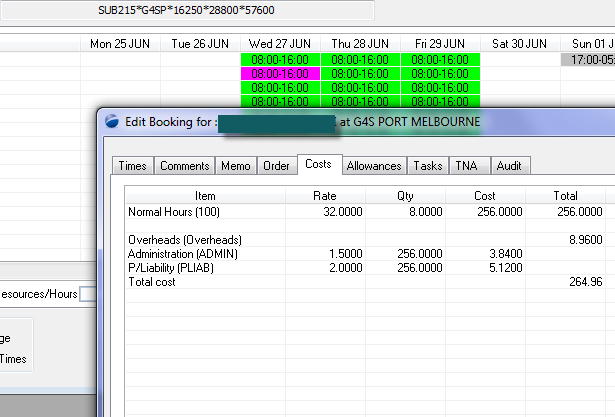
Prior to changing the configuration, the quickest way to verify whether billing details are correct, is to create a shift and check what the system has calculated out:
Here, we've opened a shift to the Costs tab, and you can see clearly that the lower section of the display has no charges details. The reason being, that the system does not know which fee schedule to apply.
Fee Schedule
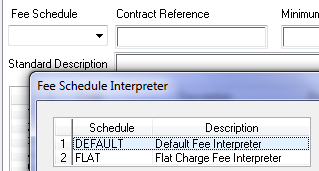
Using the dropdowns for Fee Schedule & Billing Cycle provide the currently configured options for each of these fields.
 and and 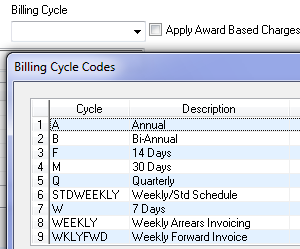
By looking at the values of D1 & D4, we can see different values - hence the fee charges are not a Flat Rate, therefore we'll select DEFAULT as the Fee Schedule.
Similarly for the Billing Cycle, the dropdown shows the currently configured values - you may change / alter / delete the values available, however, a value is required for billing to work.
Verify the Fee Schedule
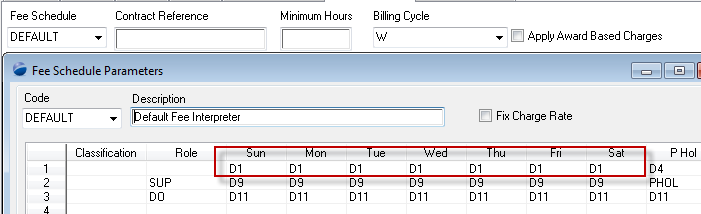
The fee schedule shown here is interpreted as:
- Line 1 indicates a charge code of "D1" for Sun - Sat & a "D4" charge code for Public Holidays
- Refering to the original configuration of D1 & D4 configured above is then correct once the fee schedule is configured against the site.
- Line 2 indicates a charge code on the basis of a Role "SUP". This means that if you configure a shift as being of type "SUP" (supervisor), then the charge code will be "D9" & "PHOL"
- Line 3 similarly speaks to a role of "DO" which in this example refers to "Duty Officer ".
- However, neither the D9, PHOL nor D11 are configured in the charge codes tab (& hence need to be to work). Unless of course those roles will never be executed at this client (site).
This indicate
Summary
To verify that the new configuration is working, revisit the shift that we looked at previously & double-click to force Powerforce to re-calculate costs, yields:
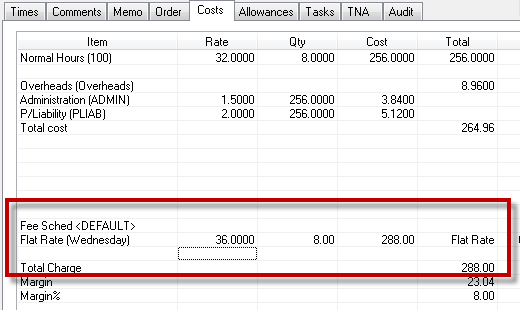
The final & correct client configuration is as follows:
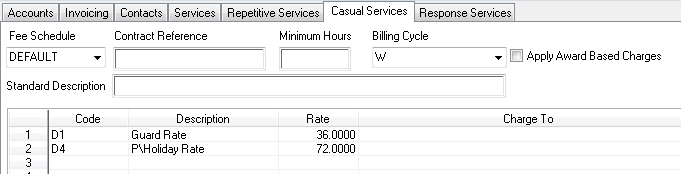
Top of Page
See Also
 PowerForce Controls PowerForce Controls
|